Here's how you do it:
1. Place log4j.jar and log4j.properties file somewhere :
I put mine:
M:/Development/Java/glassfish/lib/log4j-1.2.15.jar
M:/Development/Java/glassfish/domains/domain1/lib/logging
2. Add the fully qualified path to the log4j.jar into the classpath of Glassfish together with the directory that contains the log4j.properties file. You can do that in the web UI: Application Server/JVM Settings/Paths/System Classpath and the entries are separated by a return.
3. Restart the server - if you are in asadmin, you need to exit and enter again.
Or else just do asadmin stop-domain and then asadmin start-domain
Showing posts with label Glassfish. Show all posts
Showing posts with label Glassfish. Show all posts
Saturday, September 11, 2010

Thursday, August 6, 2009
Configuring Glassfish v2.1 to rotate logs
If you do not configure this, your logs files will grow unbounded:

There's a FAQ to do this:
How do I configure GlassFish to delete rotated log files?
Step 1: Login to Admin Console and navigate to Configuration -> System Properties

Step 2: Add in a new property com.sun.enterprise.server.logging.max_history_files

Step 3: Save and restart Glassfish

If the above does not work, set it via the java options:


There's a FAQ to do this:
How do I configure GlassFish to delete rotated log files?
Step 1: Login to Admin Console and navigate to Configuration -> System Properties

Step 2: Add in a new property com.sun.enterprise.server.logging.max_history_files

Step 3: Save and restart Glassfish

If the above does not work, set it via the java options:

Wednesday, June 10, 2009
Getting Java stack trace from Glassfish
If you run into problems with Glassfish (e.g. Glassfish hangs) and need to get a stack trace of the java process, here's how you do it without using jstack:
1. Start glassfish using asadmin
mclaren> asadmin stop-domain
Domain domain1 stopped.
mclaren> asadmin
Use "exit" to exit and "help" for online help.
asadmin> start-domain
Starting Domain domain1, please wait.
Default Log location is /home/affinium7/mas/tmp/glassfish/domains/domain1/logs/server.log.
Redirecting output to /home/affinium7/mas/tmp/glassfish/domains/domain1/logs/server.log
Domain domain1 is ready to receive client requests. Additional services are being started in background.
Domain [domain1] is running [Sun GlassFish Enterprise Server v2.1 (9.1.1) (build b60e-fcs)] with its configuration and logs at: [/home/affinium7/mas/tmp/glassfish/domains].
Admin Console is available at [http://localhost:4848].
Use the same port [4848] for "asadmin" commands.
User web applications are available at these URLs:
[http://localhost:8888 https://localhost:8181 ].
Following web-contexts are available:
[/web1 /__wstx-services ].
Standard JMX Clients (like JConsole) can connect to JMXServiceURL:
[service:jmx:rmi:///jndi/rmi://mclaren:8686/jmxrmi] for domain management purposes.
Domain listens on at least following ports for connections:
[8888 8181 4848 3700 3820 3920 8686 ].
Domain does not support application server clusters and other standalone instances.
2. Remain in asadmin (do not exit)
3. Open another terminal window and get the process id of the running domain
(normally this is the process running com.sun.enterprise.cli.framework.CLIMain)
mclaren> ps -ef| grep glass
affiniu7 479618 565548 120 09:44:38 pts/8 27:47 /usr/java5_64/jre/../bin/java -Dcom.sun.aas.instanceRoot=/home/affinium7/mas/tmp/glassfish/domains/domain1 -Dcom.sun.aas.ClassPathPrefix= -Dcom.sun.aas.ClassPathSuffix= -Dcom.sun.aas.ServerClassPath= -Dcom.sun.aas.classloader.appserverChainJars.ee= -Dcom.sun.aas.classloader.appserverChainJars=admin-cli.jar,admin-cli-ee.jar,j2ee-svc.jar -Dcom.sun.aas.classloader.excludesList=admin-cli.jar,appserv-upgrade.jar,sun-appserv-ant.jar -Dcom.sun.aas.classloader.optionalOverrideableChain.ee= -Dcom.sun.aas.classloader.optionalOverrideableChain=webservices-rt.jar,webservices-tools.jar -Dcom.sun.aas.classloader.serverClassPath.ee=/lib/hadbjdbc4.jar,/home/affinium7/mas/tmp/glassfish/lib/SUNWjdmk/5.1/lib/jdmkrt.jar,/lib/dbstate.jar,/lib/hadbm.jar,/lib/hadbmgt.jar,/lib/mfwk_instrum_tk.jar -Dcom.sun.aas.classloader.serverClassPath=/home/affinium7/mas/tmp/glassfish/lib/install/applications/jmsra/imqjmsra.jar,/home/affinium7/mas/tmp/glassfish/imq/lib/jaxm-api.jar,/home/affinium7/mas/tmp/glassfish/imq/lib/fscontext.jar,/home/affinium7/mas/tmp/glassfish/imq/lib/imqbroker.jar,/home/affinium7/mas/tmp/glassfish/imq/lib/imqjmx.jar,/home/affinium7/mas/tmp/glassfish/lib/ant/lib/ant.jar,/home/affinium7/mas/tmp/glassfish/lib/SUNWjdmk/5.1/lib/jdmkrt.jar -Dcom.sun.aas.classloader.sharedChainJars.ee=appserv-se.jar,appserv-ee.jar,jesmf-plugin.jar,/lib/dbstate.jar,/lib/hadbjdbc4.jar,jgroups-all.jar,/lib/mfwk_instrum_tk.jar -Dcom.sun.aas.classloader.sharedChainJars=javaee.jar,/usr/java5_64/jre/../lib/tools.jar,install/applications/jmsra/imqjmsra.jar,com-sun-commons-launcher.jar,com-sun-commons-logging.jar,/home/affinium7/mas/tmp/glassfish/imq/lib/jaxm-api.jar,/home/affinium7/mas/tmp/glassfish/imq/lib/fscontext.jar,/home/affinium7/mas/tmp/glassfish/imq/lib/imqbroker.jar,/home/affinium7/mas/tmp/glassfish/imq/lib/imqjmx.jar,/home/affinium7/mas/tmp/glassfish/imq/lib/imqxm.jar,webservices-rt.jar,webservices-tools.jar,mail.jar,appserv-jstl.jar,jmxremote_optional.jar,/home/affinium7/mas/tmp/glassfish/lib/SUNWjdmk/5.1/lib/jdmkrt.jar,activation.jar,appserv-rt.jar,appserv-admin.jar,appserv-cmp.jar,/home/affinium7/mas/tmp/glassfish/updatecenter/lib/updatecenter.jar,/home/affinium7/mas/tmp/glassfish/jbi/lib/jbi.jar,/home/affinium7/mas/tmp/glassfish/imq/lib/imqjmx.jar,/home/affinium7/mas/tmp/glassfish/lib/ant/lib/ant.jar,dbschema.jar -Dcom.sun.aas.configName=server-config -Dcom.sun.aas.configRoot=/home/affinium7/mas/tmp/glassfish/config -Dcom.sun.aas.defaultLogFile=/home/affinium7/mas/tmp/glassfish/domains/domain1/logs/server.log -Dcom.sun.aas.domainName=domain1 -Dcom.sun.aas.installRoot=/home/affinium7/mas/tmp/glassfish -Dcom.sun.aas.instanceName=server -Dcom.sun.aas.processLauncher=SE -Dcom.sun.aas.promptForIdentity=true -Dcom.sun.enterprise.config.config_environment_factory_class=com.sun.enterprise.config.serverbeans.AppserverConfigEnvironmentFactory -Dcom.sun.enterprise.overrideablejavaxpackages=javax.help,javax.portlet -Dcom.sun.enterprise.taglibs=appserv-jstl.jar,jsf-impl.jar -Dcom.sun.enterprise.taglisteners=jsf-impl.jar -Dcom.sun.updatecenter.home=/home/affinium7/mas/tmp/glassfish/updatecenter -Ddomain.name=domain1 -Djava.endorsed.dirs=/home/affinium7/mas/tmp/glassfish/lib/endorsed -Djava.ext.dirs=/usr/java5_64/jre/../lib/ext:/usr/java5_64/jre/../jre/lib/ext:/home/affinium7/mas/tmp/glassfish/domains/domain1/lib/ext:/home/affinium7/mas/tmp/glassfish/javadb/lib -Djava.library.path=/home/affinium7/mas/tmp/glassfish/lib:/home/affinium7/mas/tmp/glassfish/lib:/home/affinium7/mas/tmp/glassfish/lib -Djava.security.auth.login.config=/home/affinium7/mas/tmp/glassfish/domains/domain1/config/login.conf -Djava.security.policy=/home/affinium7/mas/tmp/glassfish/domains/domain1/config/server.policy -Djava.util.logging.manager=com.sun.enterprise.server.logging.ServerLogManager -Djavax.management.builder.initial=com.sun.enterprise.admin.server.core.jmx.AppServerMBeanServerBuilder -Djavax.net.ssl.keyStore=/home/affinium7/mas/tmp/glassfish/domains/domain1/config/keystore.jks -Djavax.net.ssl.trustStore=/home/affinium7/mas/tmp/glassfish/domains/domain1/config/cacerts.jks -Djdbc.drivers=org.apache.derby.jdbc.ClientDriver -Djmx.invoke.getters=true -Dsun.rmi.dgc.client.gcInterval=3600000 -Dsun.rmi.dgc.server.gcInterval=3600000 -Xmx512m -cp /home/affinium7/mas/tmp/glassfish/lib/jhall.jar:/home/affinium7/mas/tmp/glassfish/lib/appserv-launch.jar:/home/affinium7/mas/tmp/glassfish/domains/domain1/lib/log4j com.sun.enterprise.server.PELaunch start
affiniu7 508166 610564 0 10:11:12 pts/6 0:00 grep glass
affiniu7 565548 729806 0 09:44:27 pts/8 0:15 /usr/java5_64/jre/../bin/java -Dcom.sun.aas.instanceName=server -Djava.library.path=/home/affinium7/mas/tmp/glassfish/lib:/home/affinium7/mas/tmp/glassfish/lib:/home/affinium7/mas/tmp/glassfish/lib -Dcom.sun.aas.configRoot=/home/affinium7/mas/tmp/glassfish/config -Djava.endorsed.dirs=/home/affinium7/mas/tmp/glassfish/lib/endorsed -Dcom.sun.aas.processLauncher=SE -cp /home/affinium7/mas/tmp/glassfish/javadb/lib/derby.jar:/home/affinium7/mas/tmp/glassfish/jbi/lib/jbi-admin-cli.jar:/home/affinium7/mas/tmp/glassfish/jbi/lib/jbi-admin-common.jar:/home/affinium7/mas/tmp/glassfish/lib:/home/affinium7/mas/tmp/glassfish/lib/comms-appserv-rt.jar:/home/affinium7/mas/tmp/glassfish/lib/appserv-rt.jar:/home/affinium7/mas/tmp/glassfish/lib/appserv-ext.jar:/home/affinium7/mas/tmp/glassfish/lib/javaee.jar:/home/affinium7/mas/tmp/glassfish/lib/appserv-se.jar:/home/affinium7/mas/tmp/glassfish/lib/comms-appserv-admin-cli.jar:/home/affinium7/mas/tmp/glassfish/lib/admin-cli.jar:/home/affinium7/mas/tmp/glassfish/lib/appserv-admin.jar:/home/affinium7/mas/tmp/glassfish/lib/commons-launcher.jar:/home/affinium7/mas/tmp/glassfish/lib/install/applications/jmsra/imqjmsra.jar -Dcom.sun.appserv.admin.pluggable.features=com.sun.enterprise.ee.admin.pluggable.EEClientPluggableFeatureImpl com.sun.enterprise.cli.framework.CLIMain
4. Do a kill -3
mclaren> kill -3 565548
5. Switch back to asadmin terminal and you will see the location of the stack trace:
asadmin> JVMDUMP006I Processing Dump Event "user", detail "" - Please Wait.
JVMDUMP007I JVM Requesting Java Dump using '/home/affinium7/mas/tmp/glassfish/bin/javacore.20090610.101131.565548.txt'
JVMDUMP010I Java Dump written to /home/affinium7/mas/tmp/glassfish/bin/javacore.20090610.101131.565548.txt
JVMDUMP013I Processed Dump Event "user", detail "".
6. View the file to debug further :-)
1. Start glassfish using asadmin
mclaren> asadmin stop-domain
Domain domain1 stopped.
mclaren> asadmin
Use "exit" to exit and "help" for online help.
asadmin> start-domain
Starting Domain domain1, please wait.
Default Log location is /home/affinium7/mas/tmp/glassfish/domains/domain1/logs/server.log.
Redirecting output to /home/affinium7/mas/tmp/glassfish/domains/domain1/logs/server.log
Domain domain1 is ready to receive client requests. Additional services are being started in background.
Domain [domain1] is running [Sun GlassFish Enterprise Server v2.1 (9.1.1) (build b60e-fcs)] with its configuration and logs at: [/home/affinium7/mas/tmp/glassfish/domains].
Admin Console is available at [http://localhost:4848].
Use the same port [4848] for "asadmin" commands.
User web applications are available at these URLs:
[http://localhost:8888 https://localhost:8181 ].
Following web-contexts are available:
[/web1 /__wstx-services ].
Standard JMX Clients (like JConsole) can connect to JMXServiceURL:
[service:jmx:rmi:///jndi/rmi://mclaren:8686/jmxrmi] for domain management purposes.
Domain listens on at least following ports for connections:
[8888 8181 4848 3700 3820 3920 8686 ].
Domain does not support application server clusters and other standalone instances.
2. Remain in asadmin (do not exit)
3. Open another terminal window and get the process id of the running domain
(normally this is the process running com.sun.enterprise.cli.framework.CLIMain)
mclaren> ps -ef| grep glass
affiniu7 479618 565548 120 09:44:38 pts/8 27:47 /usr/java5_64/jre/../bin/java -Dcom.sun.aas.instanceRoot=/home/affinium7/mas/tmp/glassfish/domains/domain1 -Dcom.sun.aas.ClassPathPrefix= -Dcom.sun.aas.ClassPathSuffix= -Dcom.sun.aas.ServerClassPath= -Dcom.sun.aas.classloader.appserverChainJars.ee= -Dcom.sun.aas.classloader.appserverChainJars=admin-cli.jar,admin-cli-ee.jar,j2ee-svc.jar -Dcom.sun.aas.classloader.excludesList=admin-cli.jar,appserv-upgrade.jar,sun-appserv-ant.jar -Dcom.sun.aas.classloader.optionalOverrideableChain.ee= -Dcom.sun.aas.classloader.optionalOverrideableChain=webservices-rt.jar,webservices-tools.jar -Dcom.sun.aas.classloader.serverClassPath.ee=/lib/hadbjdbc4.jar,/home/affinium7/mas/tmp/glassfish/lib/SUNWjdmk/5.1/lib/jdmkrt.jar,/lib/dbstate.jar,/lib/hadbm.jar,/lib/hadbmgt.jar,/lib/mfwk_instrum_tk.jar -Dcom.sun.aas.classloader.serverClassPath=/home/affinium7/mas/tmp/glassfish/lib/install/applications/jmsra/imqjmsra.jar,/home/affinium7/mas/tmp/glassfish/imq/lib/jaxm-api.jar,/home/affinium7/mas/tmp/glassfish/imq/lib/fscontext.jar,/home/affinium7/mas/tmp/glassfish/imq/lib/imqbroker.jar,/home/affinium7/mas/tmp/glassfish/imq/lib/imqjmx.jar,/home/affinium7/mas/tmp/glassfish/lib/ant/lib/ant.jar,/home/affinium7/mas/tmp/glassfish/lib/SUNWjdmk/5.1/lib/jdmkrt.jar -Dcom.sun.aas.classloader.sharedChainJars.ee=appserv-se.jar,appserv-ee.jar,jesmf-plugin.jar,/lib/dbstate.jar,/lib/hadbjdbc4.jar,jgroups-all.jar,/lib/mfwk_instrum_tk.jar -Dcom.sun.aas.classloader.sharedChainJars=javaee.jar,/usr/java5_64/jre/../lib/tools.jar,install/applications/jmsra/imqjmsra.jar,com-sun-commons-launcher.jar,com-sun-commons-logging.jar,/home/affinium7/mas/tmp/glassfish/imq/lib/jaxm-api.jar,/home/affinium7/mas/tmp/glassfish/imq/lib/fscontext.jar,/home/affinium7/mas/tmp/glassfish/imq/lib/imqbroker.jar,/home/affinium7/mas/tmp/glassfish/imq/lib/imqjmx.jar,/home/affinium7/mas/tmp/glassfish/imq/lib/imqxm.jar,webservices-rt.jar,webservices-tools.jar,mail.jar,appserv-jstl.jar,jmxremote_optional.jar,/home/affinium7/mas/tmp/glassfish/lib/SUNWjdmk/5.1/lib/jdmkrt.jar,activation.jar,appserv-rt.jar,appserv-admin.jar,appserv-cmp.jar,/home/affinium7/mas/tmp/glassfish/updatecenter/lib/updatecenter.jar,/home/affinium7/mas/tmp/glassfish/jbi/lib/jbi.jar,/home/affinium7/mas/tmp/glassfish/imq/lib/imqjmx.jar,/home/affinium7/mas/tmp/glassfish/lib/ant/lib/ant.jar,dbschema.jar -Dcom.sun.aas.configName=server-config -Dcom.sun.aas.configRoot=/home/affinium7/mas/tmp/glassfish/config -Dcom.sun.aas.defaultLogFile=/home/affinium7/mas/tmp/glassfish/domains/domain1/logs/server.log -Dcom.sun.aas.domainName=domain1 -Dcom.sun.aas.installRoot=/home/affinium7/mas/tmp/glassfish -Dcom.sun.aas.instanceName=server -Dcom.sun.aas.processLauncher=SE -Dcom.sun.aas.promptForIdentity=true -Dcom.sun.enterprise.config.config_environment_factory_class=com.sun.enterprise.config.serverbeans.AppserverConfigEnvironmentFactory -Dcom.sun.enterprise.overrideablejavaxpackages=javax.help,javax.portlet -Dcom.sun.enterprise.taglibs=appserv-jstl.jar,jsf-impl.jar -Dcom.sun.enterprise.taglisteners=jsf-impl.jar -Dcom.sun.updatecenter.home=/home/affinium7/mas/tmp/glassfish/updatecenter -Ddomain.name=domain1 -Djava.endorsed.dirs=/home/affinium7/mas/tmp/glassfish/lib/endorsed -Djava.ext.dirs=/usr/java5_64/jre/../lib/ext:/usr/java5_64/jre/../jre/lib/ext:/home/affinium7/mas/tmp/glassfish/domains/domain1/lib/ext:/home/affinium7/mas/tmp/glassfish/javadb/lib -Djava.library.path=/home/affinium7/mas/tmp/glassfish/lib:/home/affinium7/mas/tmp/glassfish/lib:/home/affinium7/mas/tmp/glassfish/lib -Djava.security.auth.login.config=/home/affinium7/mas/tmp/glassfish/domains/domain1/config/login.conf -Djava.security.policy=/home/affinium7/mas/tmp/glassfish/domains/domain1/config/server.policy -Djava.util.logging.manager=com.sun.enterprise.server.logging.ServerLogManager -Djavax.management.builder.initial=com.sun.enterprise.admin.server.core.jmx.AppServerMBeanServerBuilder -Djavax.net.ssl.keyStore=/home/affinium7/mas/tmp/glassfish/domains/domain1/config/keystore.jks -Djavax.net.ssl.trustStore=/home/affinium7/mas/tmp/glassfish/domains/domain1/config/cacerts.jks -Djdbc.drivers=org.apache.derby.jdbc.ClientDriver -Djmx.invoke.getters=true -Dsun.rmi.dgc.client.gcInterval=3600000 -Dsun.rmi.dgc.server.gcInterval=3600000 -Xmx512m -cp /home/affinium7/mas/tmp/glassfish/lib/jhall.jar:/home/affinium7/mas/tmp/glassfish/lib/appserv-launch.jar:/home/affinium7/mas/tmp/glassfish/domains/domain1/lib/log4j com.sun.enterprise.server.PELaunch start
affiniu7 508166 610564 0 10:11:12 pts/6 0:00 grep glass
affiniu7 565548 729806 0 09:44:27 pts/8 0:15 /usr/java5_64/jre/../bin/java -Dcom.sun.aas.instanceName=server -Djava.library.path=/home/affinium7/mas/tmp/glassfish/lib:/home/affinium7/mas/tmp/glassfish/lib:/home/affinium7/mas/tmp/glassfish/lib -Dcom.sun.aas.configRoot=/home/affinium7/mas/tmp/glassfish/config -Djava.endorsed.dirs=/home/affinium7/mas/tmp/glassfish/lib/endorsed -Dcom.sun.aas.processLauncher=SE -cp /home/affinium7/mas/tmp/glassfish/javadb/lib/derby.jar:/home/affinium7/mas/tmp/glassfish/jbi/lib/jbi-admin-cli.jar:/home/affinium7/mas/tmp/glassfish/jbi/lib/jbi-admin-common.jar:/home/affinium7/mas/tmp/glassfish/lib:/home/affinium7/mas/tmp/glassfish/lib/comms-appserv-rt.jar:/home/affinium7/mas/tmp/glassfish/lib/appserv-rt.jar:/home/affinium7/mas/tmp/glassfish/lib/appserv-ext.jar:/home/affinium7/mas/tmp/glassfish/lib/javaee.jar:/home/affinium7/mas/tmp/glassfish/lib/appserv-se.jar:/home/affinium7/mas/tmp/glassfish/lib/comms-appserv-admin-cli.jar:/home/affinium7/mas/tmp/glassfish/lib/admin-cli.jar:/home/affinium7/mas/tmp/glassfish/lib/appserv-admin.jar:/home/affinium7/mas/tmp/glassfish/lib/commons-launcher.jar:/home/affinium7/mas/tmp/glassfish/lib/install/applications/jmsra/imqjmsra.jar -Dcom.sun.appserv.admin.pluggable.features=com.sun.enterprise.ee.admin.pluggable.EEClientPluggableFeatureImpl com.sun.enterprise.cli.framework.CLIMain
4. Do a kill -3
mclaren> kill -3 565548
5. Switch back to asadmin terminal and you will see the location of the stack trace:
asadmin> JVMDUMP006I Processing Dump Event "user", detail "" - Please Wait.
JVMDUMP007I JVM Requesting Java Dump using '/home/affinium7/mas/tmp/glassfish/bin/javacore.20090610.101131.565548.txt'
JVMDUMP010I Java Dump written to /home/affinium7/mas/tmp/glassfish/bin/javacore.20090610.101131.565548.txt
JVMDUMP013I Processed Dump Event "user", detail "".
6. View the file to debug further :-)
Thursday, May 21, 2009
Changing Glassfish default ports
By default, Glassfish will run on port 8080 (HTTP), 8181 (HTTPS). To change the ports, you can
1. Change setup.xml (if you have not created the domain)
2. Change domain.xml (if you have created the domain). This file is found in glassfish/domains/domain1/config/domain.xml
Look for the following line:
And change 8080 to your new port.
1. Change setup.xml (if you have not created the domain)
2. Change domain.xml (if you have created the domain). This file is found in glassfish/domains/domain1/config/domain.xml
Look for the following line:
And change 8080 to your new port.
Installing Glassfish on AIX
At this point in time, V3 is not available on AIX, so I will be using 2.1
1. Install JDK 1.5 or 1.6. You can download this from IBM AIX website.
2. Download Glassfish bundle from here. For AIX, downloaded glassfish-installer-v2.1-b60e-aix.jar size (61M). Note: ml stands for multi-language
3. Run the following command
% java -Xmx256m -jar glassfish-installer-v2.1-b60e-aix.jar
This command will unbundle GlassFish and create a new directory structure rooted under a directory named 'glassfish'.
4. CD to the glassfish subdirectory.
% cd glassfish
5. Set the execute permission for the Ant binaries that are included with the GlassFish bundle.
% chmod -R +x lib/ant/bin
% lib/ant/bin/ant -f setup.xml
6. On AIX, you may run into the following error:
create.domain:
[exec] Using port 4848 for Admin.
[exec] Using port 8080 for HTTP Instance.
[exec] Using port 7676 for JMS.
[exec] Using port 3700 for IIOP.
[exec] Using port 8181 for HTTP_SSL.
[exec] Using default port 3820 for IIOP_SSL.
[exec] Using default port 3920 for IIOP_MUTUALAUTH.
[exec] Using default port 8686 for JMX_ADMIN.
[exec] Domain being created with profile:developer, as specified by variable AS_ADMIN_PROFILE in configuration file.
[exec] ------ Using Profile [developer] to create the domain ------
[exec] XML processing for profile: Base document [/home/affinium7/mas/glassfish/lib/install/templates/default-domain.xml.template]. Profile name
property [domain.xml.style-sheets].
[exec] Security Store uses: JKS
[exec] File {0} not found.
[exec] CLI130 Could not create domain, domain1
BUILD FAILED
/home/affinium7/mas/glassfish/setup.xml:177: The following error occurred while executing this line:
/home/affinium7/mas/glassfish/setup.xml:607: exec returned: 1
Total time: 53 seconds
7. If you get the above error, it means .asadmintruststore was not created during installation and you will need to generate a new key. For full discussion on this, visit this post.
8. Run the following commmand to solve the problem:
keytool -genkey -keyalg RSA -keystore ~/.asadmintruststore -alias junk
9. Your actions will be as follows:
mclaren> keytool -genkey -keyalg RSA -keystore ~/.asadmintruststore -alias junk
Enter keystore password:
Re-enter new password:
What is your first and last name?
[Unknown]: XXX
What is the name of your organizational unit?
[Unknown]: Consumer Marketing
What is the name of your organization?
[Unknown]: XXX
What is the name of your City or Locality?
[Unknown]: Singapore
What is the name of your State or Province?
[Unknown]: Singapore
What is the two-letter country code for this unit?
[Unknown]: SG
Is CN=XXX, OU=Consumer Marketing, O=XXX, L=Singapore, ST=Singapore, C=SG correct? (type "yes" or "no")
[no]: yes
Enter key password for:
(RETURN if same as keystore password):
mclaren>
10. Once that is done, re-run the setup and your BUILD should be successful:
create.domain:
[exec] Using port 4848 for Admin.
[exec] Using port 8080 for HTTP Instance.
[exec] Using port 7676 for JMS.
[exec] Using port 3700 for IIOP.
[exec] Using port 8181 for HTTP_SSL.
[exec] Using default port 3820 for IIOP_SSL.
[exec] Using default port 3920 for IIOP_MUTUALAUTH.
[exec] Using default port 8686 for JMX_ADMIN.
[exec] Domain being created with profile:developer, as specified by variable AS_ADMIN_PROFILE in configuration file.
[exec] ------ Using Profile [developer] to create the domain ------
[exec] XML processing for profile: Base document [/home/affinium7/mas/glassfish/lib/install/templates/default-domain.xml.template]. Profile name [developer]. Processing property [domain.xml.style-sheets].
[exec] Security Store uses: JKS
[exec] Domain domain1 created.
[exec] Login information relevant to admin user name [admin] for this domain [domain1] stored at [/home/affinium7/.asadminpass] successfully.
[exec] Make sure that this file remains protected. Information stored in this file will be used by asadmin commands to manage this domain.
[delete] Deleting: /home/affinium7/mas/glassfish/passfile
BUILD SUCCESSFUL
Total time: 36 seconds
11. To start the app server:
cd glassfish/bin
asadmin start-domain
Domain domain1 is ready to receive client requests. Additional services are being started in background.
Domain [domain1] is running [Sun GlassFish Enterprise Server v2.1 (9.1.1) (build b60e-fcs)] with its configuration and logs at: [/home/affinium7/mas/glassfish/domains].
Admin Console is available at [http://localhost:4848].
Use the same port [4848] for "asadmin" commands.
User web applications are available at these URLs:
[http://localhost:8080 https://localhost:8181 ].
Following web-contexts are available:
[/web1 /__wstx-services HelloWorldService ].
Standard JMX Clients (like JConsole) can connect to JMXServiceURL:
[service:jmx:rmi:///jndi/rmi://mclaren:8686/jmxrmi] for domain management purposes.
Domain listens on at least following ports for connections:
[8080 8181 4848 3700 3820 3920 8686 ].
Domain does not support application server clusters and other standalone instances.
12. The default ports are:
admin port: 4848
app port: 8080
13. The default login to the admin server is
User: admin
Password: adminamin
Here's another good link that documents the installation/configuration of Glassfish. Click here.
1. Install JDK 1.5 or 1.6. You can download this from IBM AIX website.
2. Download Glassfish bundle from here. For AIX, downloaded glassfish-installer-v2.1-b60e-aix.jar size (61M). Note: ml stands for multi-language
3. Run the following command
% java -Xmx256m -jar glassfish-installer-v2.1-b60e-aix.jar
This command will unbundle GlassFish and create a new directory structure rooted under a directory named 'glassfish'.
4. CD to the glassfish subdirectory.
% cd glassfish
5. Set the execute permission for the Ant binaries that are included with the GlassFish bundle.
% chmod -R +x lib/ant/bin
% lib/ant/bin/ant -f setup.xml
6. On AIX, you may run into the following error:
create.domain:
[exec] Using port 4848 for Admin.
[exec] Using port 8080 for HTTP Instance.
[exec] Using port 7676 for JMS.
[exec] Using port 3700 for IIOP.
[exec] Using port 8181 for HTTP_SSL.
[exec] Using default port 3820 for IIOP_SSL.
[exec] Using default port 3920 for IIOP_MUTUALAUTH.
[exec] Using default port 8686 for JMX_ADMIN.
[exec] Domain being created with profile:developer, as specified by variable AS_ADMIN_PROFILE in configuration file.
[exec] ------ Using Profile [developer] to create the domain ------
[exec] XML processing for profile: Base document [/home/affinium7/mas/glassfish/lib/install/templates/default-domain.xml.template]. Profile name
property [domain.xml.style-sheets].
[exec] Security Store uses: JKS
[exec] File {0} not found.
[exec] CLI130 Could not create domain, domain1
BUILD FAILED
/home/affinium7/mas/glassfish/setup.xml:177: The following error occurred while executing this line:
/home/affinium7/mas/glassfish/setup.xml:607: exec returned: 1
Total time: 53 seconds
7. If you get the above error, it means .asadmintruststore was not created during installation and you will need to generate a new key. For full discussion on this, visit this post.
8. Run the following commmand to solve the problem:
keytool -genkey -keyalg RSA -keystore ~/.asadmintruststore -alias junk
9. Your actions will be as follows:
mclaren> keytool -genkey -keyalg RSA -keystore ~/.asadmintruststore -alias junk
Enter keystore password:
Re-enter new password:
What is your first and last name?
[Unknown]: XXX
What is the name of your organizational unit?
[Unknown]: Consumer Marketing
What is the name of your organization?
[Unknown]: XXX
What is the name of your City or Locality?
[Unknown]: Singapore
What is the name of your State or Province?
[Unknown]: Singapore
What is the two-letter country code for this unit?
[Unknown]: SG
Is CN=XXX, OU=Consumer Marketing, O=XXX, L=Singapore, ST=Singapore, C=SG correct? (type "yes" or "no")
[no]: yes
Enter key password for
(RETURN if same as keystore password):
mclaren>
10. Once that is done, re-run the setup and your BUILD should be successful:
create.domain:
[exec] Using port 4848 for Admin.
[exec] Using port 8080 for HTTP Instance.
[exec] Using port 7676 for JMS.
[exec] Using port 3700 for IIOP.
[exec] Using port 8181 for HTTP_SSL.
[exec] Using default port 3820 for IIOP_SSL.
[exec] Using default port 3920 for IIOP_MUTUALAUTH.
[exec] Using default port 8686 for JMX_ADMIN.
[exec] Domain being created with profile:developer, as specified by variable AS_ADMIN_PROFILE in configuration file.
[exec] ------ Using Profile [developer] to create the domain ------
[exec] XML processing for profile: Base document [/home/affinium7/mas/glassfish/lib/install/templates/default-domain.xml.template]. Profile name [developer]. Processing property [domain.xml.style-sheets].
[exec] Security Store uses: JKS
[exec] Domain domain1 created.
[exec] Login information relevant to admin user name [admin] for this domain [domain1] stored at [/home/affinium7/.asadminpass] successfully.
[exec] Make sure that this file remains protected. Information stored in this file will be used by asadmin commands to manage this domain.
[delete] Deleting: /home/affinium7/mas/glassfish/passfile
BUILD SUCCESSFUL
Total time: 36 seconds
11. To start the app server:
cd glassfish/bin
asadmin start-domain
Domain domain1 is ready to receive client requests. Additional services are being started in background.
Domain [domain1] is running [Sun GlassFish Enterprise Server v2.1 (9.1.1) (build b60e-fcs)] with its configuration and logs at: [/home/affinium7/mas/glassfish/domains].
Admin Console is available at [http://localhost:4848].
Use the same port [4848] for "asadmin" commands.
User web applications are available at these URLs:
[http://localhost:8080 https://localhost:8181 ].
Following web-contexts are available:
[/web1 /__wstx-services HelloWorldService ].
Standard JMX Clients (like JConsole) can connect to JMXServiceURL:
[service:jmx:rmi:///jndi/rmi://mclaren:8686/jmxrmi] for domain management purposes.
Domain listens on at least following ports for connections:
[8080 8181 4848 3700 3820 3920 8686 ].
Domain does not support application server clusters and other standalone instances.
12. The default ports are:
admin port: 4848
app port: 8080
13. The default login to the admin server is
User: admin
Password: adminamin
Here's another good link that documents the installation/configuration of Glassfish. Click here.
Tuesday, May 19, 2009
Creating HelloWorldClient using WTP
1. Create a new project for the HelloWorld client (an ordinary Java project is sufficient)
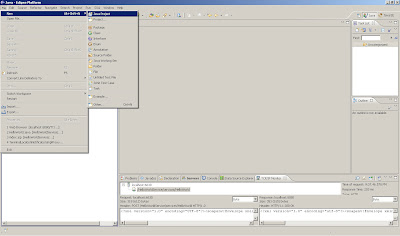
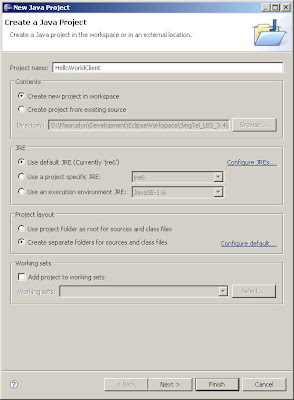
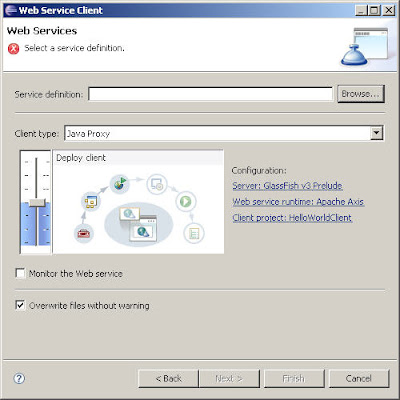
2. Create a Web Service Client
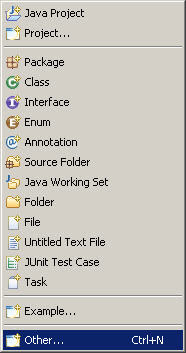
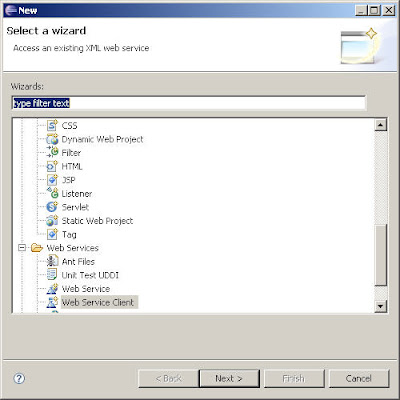
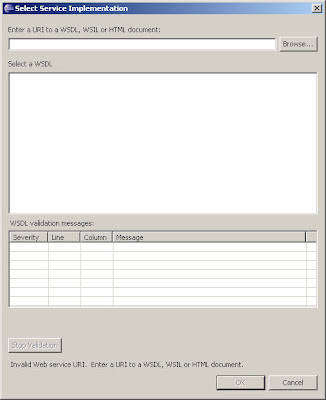
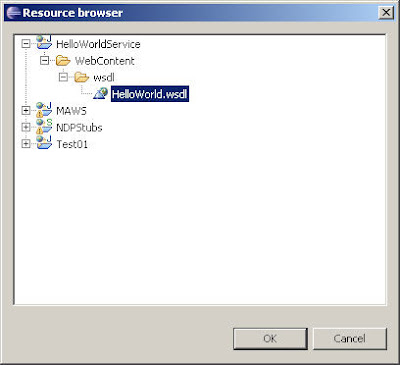
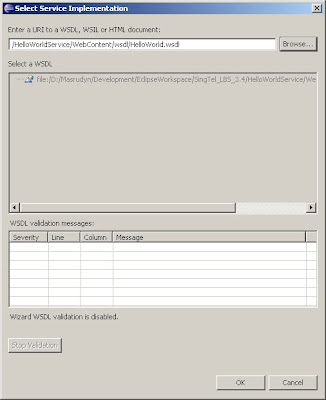
3. Click on browse and choose the WSDL location
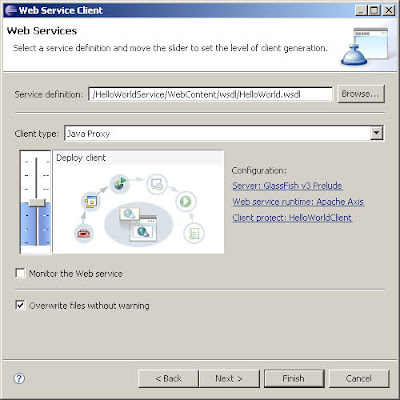
4. Increase the settings to "Test Client"
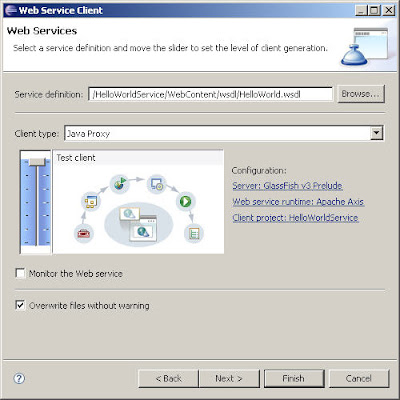
5. Choose Default settings and Click Next
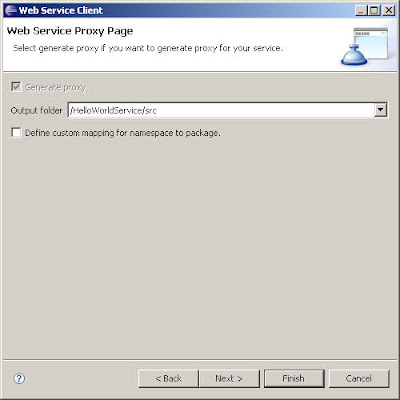
6. Choose Default settings and Click Finish
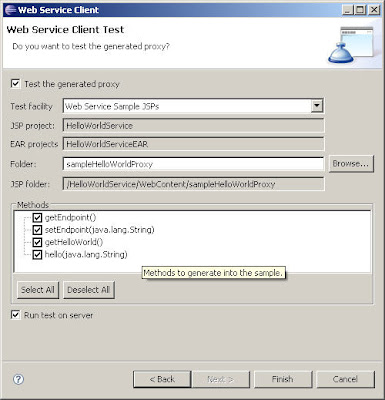
7. Eclipse will publish a test client to Glassfish
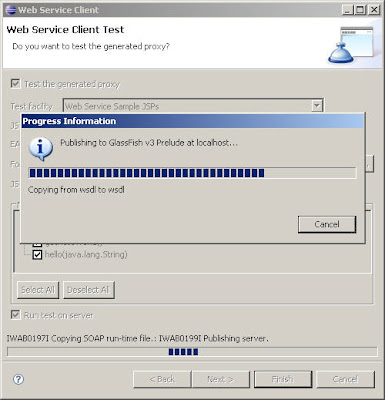
8. A test page will appear
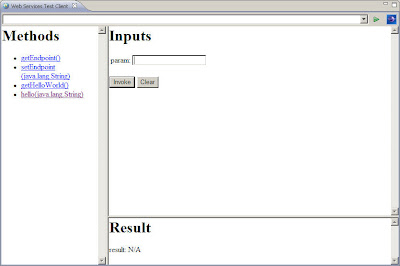
9. Check TCP/IP Monitor window to see if the SOAP calls are ok
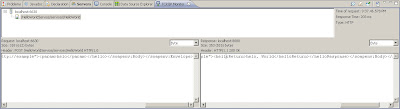


2. Create a Web Service Client


3. Click on browse and choose the WSDL location


4. Increase the settings to "Test Client"

5. Choose Default settings and Click Next

6. Choose Default settings and Click Finish

7. Eclipse will publish a test client to Glassfish

8. A test page will appear

9. Check TCP/IP Monitor window to see if the SOAP calls are ok

Configuring Oracle datasource on Glassfish
1. Stop Glassfish server and copy the database driver jar to /lib. (I am using ojdbc14.jar file)
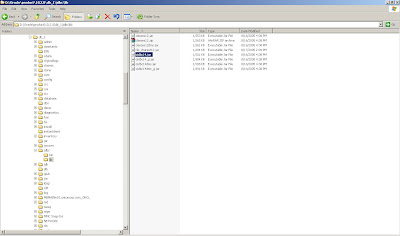
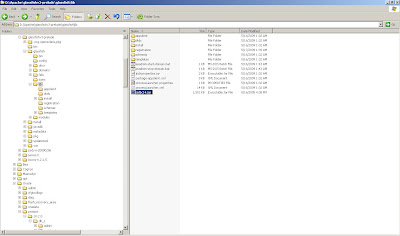
2. Once copied to the lib dir, start Glassfish again. Reload the admin console and login.

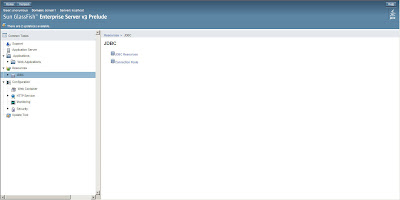
3. Expand the Resources menu item and then the JDBC menu item in the menu to the left. The JDBC menu contains two submenus, being JDBC Resources and Connection Pools. The JDBC Resource is exposed to (web) applications through JNDI. In order to create a JDBC Resource, we’ll need a Connection Pool first. To define an Oracle Connection Pool, click on connection Pools in the menu to the left.
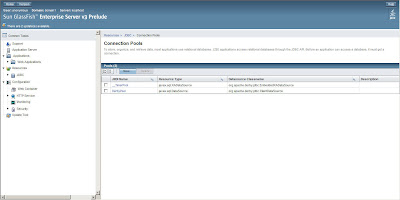
4. Next, click the New button to enter the Connection Pool wizard. The first thing to do is specify the Connection Pool Name, Resource Type and Database Vendor. The Resource Type should be javax.sql.ConnectionPoolDatasource. Select the database vendor from the select box. Since we are creating an Oracle connection pool, select Oracle and click the Next button.
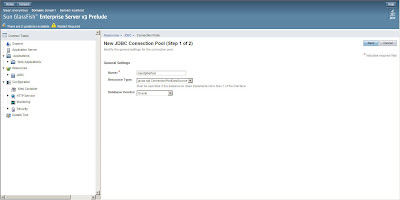
5. In the General Settings section, make sure the Datasource Classname is set to either oracle.jdbc.pool.OracleConnectionPoolDataSource (which is the default) or oracle.jdbc.xa.client.OracleXADataSource. Set all the other parameters as you like and scroll down to the Additional Properties section.
In this section, three or four properties are needed. All others can be discarded. The three needed ones are User, Password and URL. The fourth, optional, property is xa-driver-does-not-support-non-tx-operations. This property is only needed if both non-XA and XA connections are retrieved from the same connection pool.
So, specify the username, password and url. The last one is of the form jdbc:oracle:thin:@:: where usually is 1521. E.g. jdbc:oracle:thin:@pagani_s1:1521:ORCL
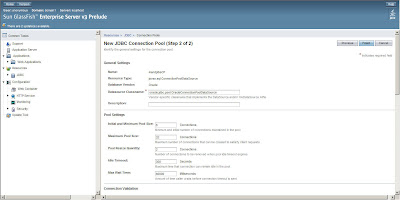
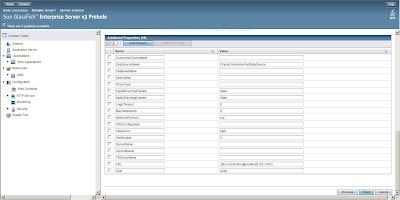
6. After specifying these properties, click Finish. This will bring you back to the connection Pool overview. Click on the Connection Pool name you just created and then the Ping button to see if the connection can be established.
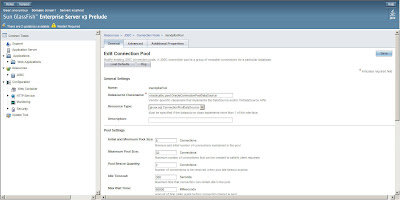
7. If you see Ping Succeeded the connection pool has been setup correctly.
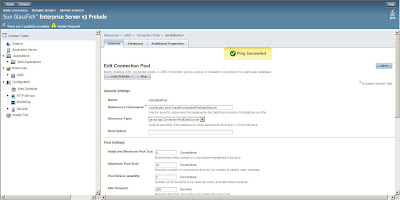
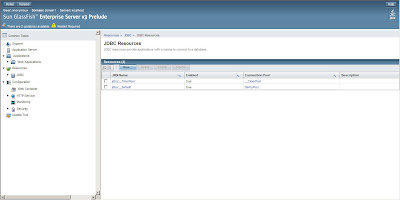
8. Now click on the JDBC Resources menu item in the menu to the left and then on the New button to create a new JDBC Resource.
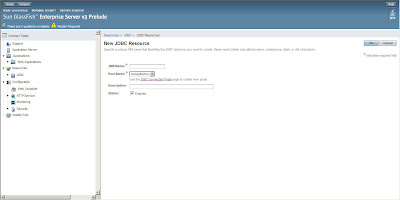
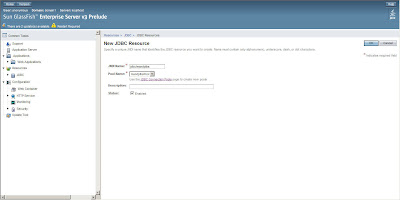
9.Enter the name for the JDBC Resource and bear in mind that JNDI JDBC datasource names usually start with "jdbc/" so enter a name like "jdbc/mandplbs" or so. Also select the Connection Pool name you just created and successfully pinged from the select box. Hit the OK button and you’re done.
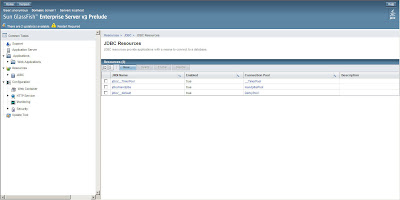


2. Once copied to the lib dir, start Glassfish again. Reload the admin console and login.

3. Expand the Resources menu item and then the JDBC menu item in the menu to the left. The JDBC menu contains two submenus, being JDBC Resources and Connection Pools. The JDBC Resource is exposed to (web) applications through JNDI. In order to create a JDBC Resource, we’ll need a Connection Pool first. To define an Oracle Connection Pool, click on connection Pools in the menu to the left.


4. Next, click the New button to enter the Connection Pool wizard. The first thing to do is specify the Connection Pool Name, Resource Type and Database Vendor. The Resource Type should be javax.sql.ConnectionPoolDatasource. Select the database vendor from the select box. Since we are creating an Oracle connection pool, select Oracle and click the Next button.

5. In the General Settings section, make sure the Datasource Classname is set to either oracle.jdbc.pool.OracleConnectionPoolDataSource (which is the default) or oracle.jdbc.xa.client.OracleXADataSource. Set all the other parameters as you like and scroll down to the Additional Properties section.
In this section, three or four properties are needed. All others can be discarded. The three needed ones are User, Password and URL. The fourth, optional, property is xa-driver-does-not-support-non-tx-operations. This property is only needed if both non-XA and XA connections are retrieved from the same connection pool.
So, specify the username, password and url. The last one is of the form jdbc:oracle:thin:@


6. After specifying these properties, click Finish. This will bring you back to the connection Pool overview. Click on the Connection Pool name you just created and then the Ping button to see if the connection can be established.

7. If you see Ping Succeeded the connection pool has been setup correctly.

8. Now click on the JDBC Resources menu item in the menu to the left and then on the New button to create a new JDBC Resource.


9.Enter the name for the JDBC Resource and bear in mind that JNDI JDBC datasource names usually start with "jdbc/" so enter a name like "jdbc/mandplbs" or so. Also select the Connection Pool name you just created and successfully pinged from the select box. Hit the OK button and you’re done.


Monday, May 18, 2009
Glassfish V3 Prelude + Eclipse Error: java.err.nojdk
If you are getting the error when running Glassfish V3 Prelude in Eclipse:
org.apache.jasper.JasperException: java.err.nojdk
at org.apache.jasper.compiler.DefaultErrorHandler.jspError(DefaultErrorHandler.java:89)
at org.apache.jasper.compiler.ErrorDispatcher.dispatch(ErrorDispatcher.java:375)
at org.apache.jasper.compiler.ErrorDispatcher.jspError(ErrorDispatcher.java:116)
at org.apache.jasper.compiler.Jsr199JavaCompiler.compile(Jsr199JavaCompiler.java:195)
at org.apache.jasper.compiler.Compiler.generateClass(Compiler.java:361)
at org.apache.jasper.compiler.Compiler.compile(Compiler.java:430)
at org.apache.jasper.JspCompilationContext.compile(JspCompilationContext.java:608)
at org.apache.jasper.servlet.JspServletWrapper.service(JspServletWrapper.java:374)
at org.apache.jasper.servlet.JspServlet.serviceJspFile(JspServlet.java:473)
at org.apache.jasper.servlet.JspServlet.service(JspServlet.java:366)
at javax.servlet.http.HttpServlet.service(HttpServlet.java:847)
at org.apache.catalina.core.ApplicationFilterChain.servletService(ApplicationFilterChain.java:431)
at org.apache.catalina.core.StandardWrapperValve.preInvoke(StandardWrapperValve.java:462)
at org.apache.catalina.core.StandardWrapperValve.invoke(StandardWrapperValve.java:139)
at org.apache.catalina.core.StandardContextValve.invoke(StandardContextValve.java:186)
at org.apache.catalina.core.StandardPipeline.doInvoke(StandardPipeline.java:719)
at org.apache.catalina.core.StandardPipeline.doInvoke(StandardPipeline.java:657)
at com.sun.enterprise.web.WebPipeline.invoke(WebPipeline.java:96)
at com.sun.enterprise.web.PESessionLockingStandardPipeline.invoke(PESessionLockingStandardPipeline.java:98)
at org.apache.catalina.core.StandardHostValve.invoke(StandardHostValve.java:187)
at org.apache.catalina.core.StandardPipeline.doInvoke(StandardPipeline.java:719)
at org.apache.catalina.core.StandardPipeline.doInvoke(StandardPipeline.java:657)
at org.apache.catalina.core.StandardPipeline.invoke(StandardPipeline.java:651)
at org.apache.catalina.core.ContainerBase.invoke(ContainerBase.java:1030)
at org.apache.catalina.core.StandardEngineValve.invoke(StandardEngineValve.java:142)
at org.apache.catalina.core.StandardPipeline.doInvoke(StandardPipeline.java:719)
at org.apache.catalina.core.StandardPipeline.doInvoke(StandardPipeline.java:657)
at org.apache.catalina.core.StandardPipeline.invoke(StandardPipeline.java:651)
at org.apache.catalina.core.ContainerBase.invoke(ContainerBase.java:1030)
at org.apache.catalina.connector.CoyoteAdapter.doService(CoyoteAdapter.java:325)
at org.apache.catalina.connector.CoyoteAdapter.service(CoyoteAdapter.java:242)
at com.sun.enterprise.v3.services.impl.ContainerMapper.service(ContainerMapper.java:180)
at com.sun.grizzly.http.DefaultProcessorTask.invokeAdapter(DefaultProcessorTask.java:633)
at com.sun.grizzly.http.DefaultProcessorTask.doProcess(DefaultProcessorTask.java:570)
at com.sun.grizzly.http.DefaultProcessorTask.process(DefaultProcessorTask.java:827)
at com.sun.grizzly.http.DefaultProtocolFilter.execute(DefaultProtocolFilter.java:152)
at com.sun.enterprise.v3.services.impl.GlassfishProtocolChain.executeProtocolFilter(GlassfishProtocolChain.java:71)
at com.sun.grizzly.DefaultProtocolChain.execute(DefaultProtocolChain.java:103)
at com.sun.grizzly.DefaultProtocolChain.execute(DefaultProtocolChain.java:89)
at com.sun.grizzly.http.HttpProtocolChain.execute(HttpProtocolChain.java:76)
at com.sun.grizzly.ProtocolChainContextTask.doCall(ProtocolChainContextTask.java:67)
at com.sun.grizzly.SelectionKeyContextTask.call(SelectionKeyContextTask.java:56)
at com.sun.grizzly.util.WorkerThreadImpl.processTask(WorkerThreadImpl.java:325)
at com.sun.grizzly.util.WorkerThreadImpl.run(WorkerThreadImpl.java:184)
The cause of the error is that while launching application; the server is not able to find the jdk version, instead its trying to launch application using jre version that it has used while launching itself.
You have 2 solutions:
1. Add JDK is to your system path:
a. JAVA_HOME=c:\java\jdk
b. PATH=c:\java\jdk\bin;
In windows; it can be done Right Click Computer Icon -> Advanced -> Environment Variables(System)
OR
2. Add the JDK environment in Eclipse:
Window -> Preferences -> Java -> Installed JREs
See screenshot below:
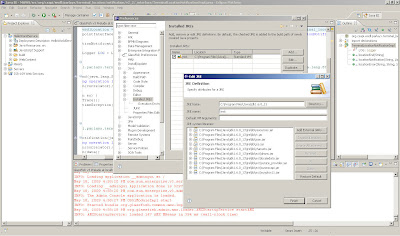
Remember to restart Eclipse and then Glassfish server via the plugin in Eclipse after making the changes.
org.apache.jasper.JasperException: java.err.nojdk
at org.apache.jasper.compiler.DefaultErrorHandler.jspError(DefaultErrorHandler.java:89)
at org.apache.jasper.compiler.ErrorDispatcher.dispatch(ErrorDispatcher.java:375)
at org.apache.jasper.compiler.ErrorDispatcher.jspError(ErrorDispatcher.java:116)
at org.apache.jasper.compiler.Jsr199JavaCompiler.compile(Jsr199JavaCompiler.java:195)
at org.apache.jasper.compiler.Compiler.generateClass(Compiler.java:361)
at org.apache.jasper.compiler.Compiler.compile(Compiler.java:430)
at org.apache.jasper.JspCompilationContext.compile(JspCompilationContext.java:608)
at org.apache.jasper.servlet.JspServletWrapper.service(JspServletWrapper.java:374)
at org.apache.jasper.servlet.JspServlet.serviceJspFile(JspServlet.java:473)
at org.apache.jasper.servlet.JspServlet.service(JspServlet.java:366)
at javax.servlet.http.HttpServlet.service(HttpServlet.java:847)
at org.apache.catalina.core.ApplicationFilterChain.servletService(ApplicationFilterChain.java:431)
at org.apache.catalina.core.StandardWrapperValve.preInvoke(StandardWrapperValve.java:462)
at org.apache.catalina.core.StandardWrapperValve.invoke(StandardWrapperValve.java:139)
at org.apache.catalina.core.StandardContextValve.invoke(StandardContextValve.java:186)
at org.apache.catalina.core.StandardPipeline.doInvoke(StandardPipeline.java:719)
at org.apache.catalina.core.StandardPipeline.doInvoke(StandardPipeline.java:657)
at com.sun.enterprise.web.WebPipeline.invoke(WebPipeline.java:96)
at com.sun.enterprise.web.PESessionLockingStandardPipeline.invoke(PESessionLockingStandardPipeline.java:98)
at org.apache.catalina.core.StandardHostValve.invoke(StandardHostValve.java:187)
at org.apache.catalina.core.StandardPipeline.doInvoke(StandardPipeline.java:719)
at org.apache.catalina.core.StandardPipeline.doInvoke(StandardPipeline.java:657)
at org.apache.catalina.core.StandardPipeline.invoke(StandardPipeline.java:651)
at org.apache.catalina.core.ContainerBase.invoke(ContainerBase.java:1030)
at org.apache.catalina.core.StandardEngineValve.invoke(StandardEngineValve.java:142)
at org.apache.catalina.core.StandardPipeline.doInvoke(StandardPipeline.java:719)
at org.apache.catalina.core.StandardPipeline.doInvoke(StandardPipeline.java:657)
at org.apache.catalina.core.StandardPipeline.invoke(StandardPipeline.java:651)
at org.apache.catalina.core.ContainerBase.invoke(ContainerBase.java:1030)
at org.apache.catalina.connector.CoyoteAdapter.doService(CoyoteAdapter.java:325)
at org.apache.catalina.connector.CoyoteAdapter.service(CoyoteAdapter.java:242)
at com.sun.enterprise.v3.services.impl.ContainerMapper.service(ContainerMapper.java:180)
at com.sun.grizzly.http.DefaultProcessorTask.invokeAdapter(DefaultProcessorTask.java:633)
at com.sun.grizzly.http.DefaultProcessorTask.doProcess(DefaultProcessorTask.java:570)
at com.sun.grizzly.http.DefaultProcessorTask.process(DefaultProcessorTask.java:827)
at com.sun.grizzly.http.DefaultProtocolFilter.execute(DefaultProtocolFilter.java:152)
at com.sun.enterprise.v3.services.impl.GlassfishProtocolChain.executeProtocolFilter(GlassfishProtocolChain.java:71)
at com.sun.grizzly.DefaultProtocolChain.execute(DefaultProtocolChain.java:103)
at com.sun.grizzly.DefaultProtocolChain.execute(DefaultProtocolChain.java:89)
at com.sun.grizzly.http.HttpProtocolChain.execute(HttpProtocolChain.java:76)
at com.sun.grizzly.ProtocolChainContextTask.doCall(ProtocolChainContextTask.java:67)
at com.sun.grizzly.SelectionKeyContextTask.call(SelectionKeyContextTask.java:56)
at com.sun.grizzly.util.WorkerThreadImpl.processTask(WorkerThreadImpl.java:325)
at com.sun.grizzly.util.WorkerThreadImpl.run(WorkerThreadImpl.java:184)
The cause of the error is that while launching application; the server is not able to find the jdk version, instead its trying to launch application using jre version that it has used while launching itself.
You have 2 solutions:
1. Add JDK is to your system path:
a. JAVA_HOME=c:\java\jdk
b. PATH=c:\java\jdk\bin;
In windows; it can be done Right Click Computer Icon -> Advanced -> Environment Variables(System)
OR
2. Add the JDK environment in Eclipse:
Window -> Preferences -> Java -> Installed JREs
See screenshot below:

Remember to restart Eclipse and then Glassfish server via the plugin in Eclipse after making the changes.
Saturday, May 16, 2009
What if I did not use the Glassfish Eclipse bundle?
Tuesday, May 12, 2009
Creating a simple HelloWorld JAX-WS Webservice using Eclipse
I'm using Glassfish Tools Bundle for Eclipse in this example. You can download it from here
1. Create a new Dynamic Web Project and give it a name eg. HelloWorldService
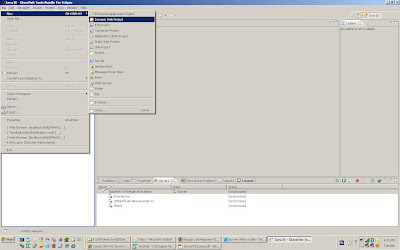
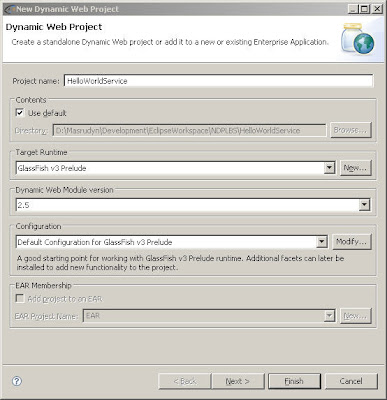
2. Ensure Target Runtime is Glassfish V3 Prelude
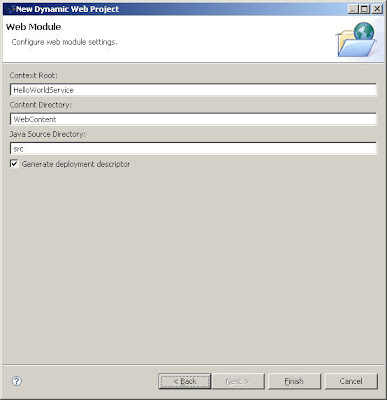
3. Choose the default settings for the Web Module Page
4. Select your new project and create a new class
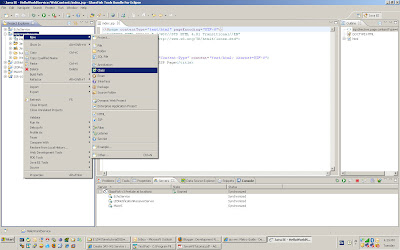
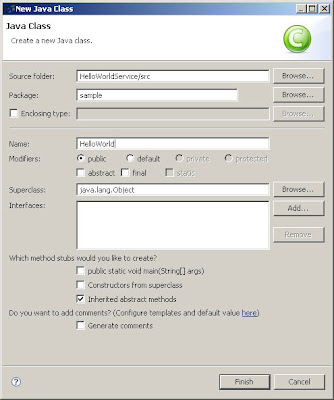
5. Name it HelloWorld. Name the package sample and click on Finish button
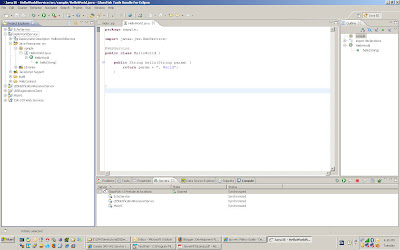
6. Enter the code below
package sample;
import javax.jws.WebService;
@WebService
public class HelloWorld {
public String hello(String param) {
return param + ", World";
}
}
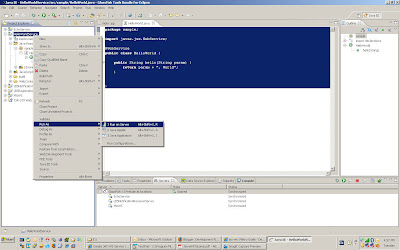
7. Deploy the service by selecting the project and select Run as>Run on server.
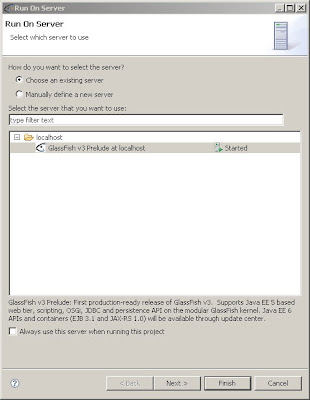
8. Choose default settings when the Run on server window appears
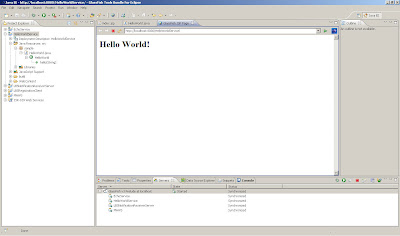
9. You will see the default jsp page displayed.
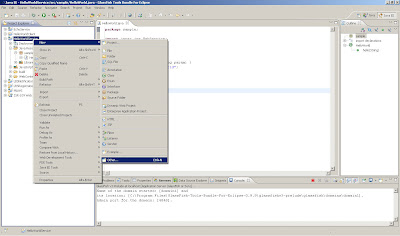
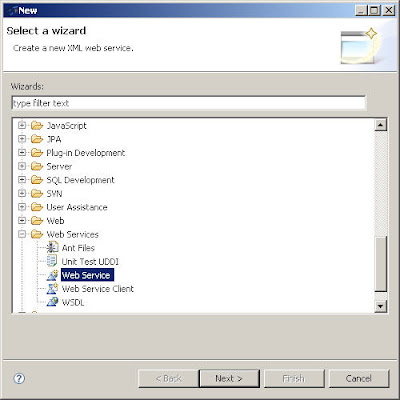
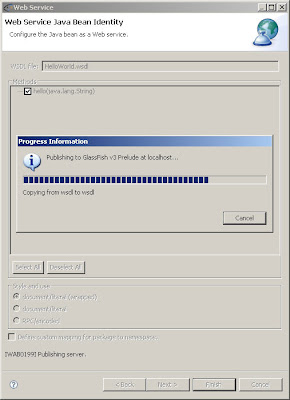
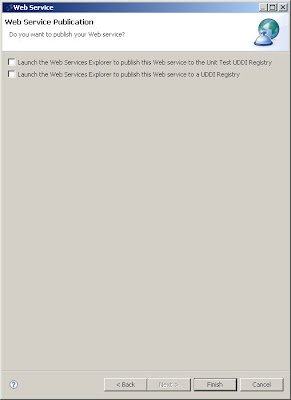
10. Right click on your project. Select New->Web Service (you'll probably need to choose "other" and find it in the full list). Go through the configuration stages. Eclipse will produce all the required stuff.
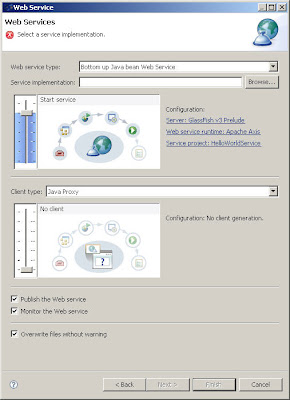
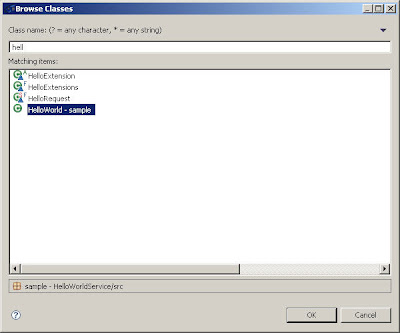
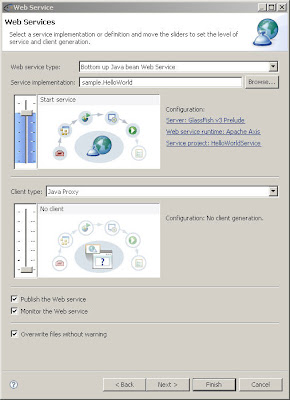
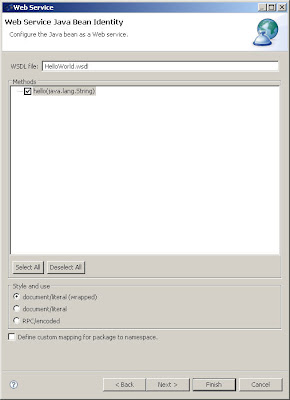
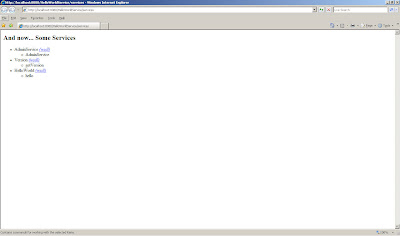
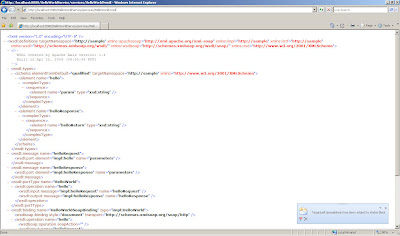
11. Start the server (if it hasn't started). If, for example, the app server port is 8080, the project URL you chose is HelloWorldService, and the class name is HelloWorld?, open a web browser and go to http://localhost:8080/HelloWorldService/services/HelloWorld?wsdll, and you should see the WSDL description.
And we are done! :-)
1. Create a new Dynamic Web Project and give it a name eg. HelloWorldService

2. Ensure Target Runtime is Glassfish V3 Prelude

3. Choose the default settings for the Web Module Page

4. Select your new project and create a new class

5. Name it HelloWorld. Name the package sample and click on Finish button

6. Enter the code below
package sample;
import javax.jws.WebService;
@WebService
public class HelloWorld {
public String hello(String param) {
return param + ", World";
}
}

7. Deploy the service by selecting the project and select Run as>Run on server.

8. Choose default settings when the Run on server window appears

9. You will see the default jsp page displayed.

10. Right click on your project. Select New->Web Service (you'll probably need to choose "other" and find it in the full list). Go through the configuration stages. Eclipse will produce all the required stuff.


11. Start the server (if it hasn't started). If, for example, the app server port is 8080, the project URL you chose is HelloWorldService, and the class name is HelloWorld?, open a web browser and go to http://localhost:8080/HelloWorldService/services/HelloWorld?wsdll, and you should see the WSDL description.


And we are done! :-)
Subscribe to:
Posts (Atom)
